SIM Providers: LTE-M/Nb-IoT + Roaming, and Setup

Written by Matthew Clark-Massera
Updated at September 1st, 2025
Table of Contents
To get online with our 4G LTE-M/NB-IoT devices, you will require a SIM card that operates on these networks. Often multiple terms are used for the same network - e.g. Cat-M1 and LTE-M are used interchangeably.
Ensure you read Connectivity - LTE-M vs NB-IoT, Coverage, Providers and Roaming as an overview of all the key concepts of LTE-M/NB-IoT.
Tracking Specific SIMs
Our LTE-M/NB-IoT devices will need special SIMs for these networks - i.e. often a standard '4G Prepaid SIM' like you would buy for your mobile phone will not get you online.
Test!
LTE-M and NB-IoT networks are relatively new and are still being rolled out in some places. Teething problems may occur.
They are usually quickly resolved and once a network has been up and running for a while you can expect trouble-free operation. However test new SIMs, networks, and technologies thoroughly before deploying in volume.
Pricing - you get what you pay for
When deploying many devices, even small differences in data costs can quickly rack up.
Often the expensive SIM cards are more reliable and provide better connectivity. Not all SIM cards work the same - some can even reduce device battery life.
Commercial Deployments
Low-cost, relatively unknown roaming SIM cards can be tempting. However certain networks may have agreements with the providers that if a roaming SIM stays attached to their network for too long (e.g.> 6 months continuously) - it can be kicked off.
Any savings on SIM data will quickly evaporate if units need to be recovered and SIMs swapped. This is not to discourage cost-saving measures, lower-priced tracking is great for everyone! However, the risks and benefits should be considered when choosing untested SIMs and networks. Test thoroughly before rolling out large-scale deployments.
So what SIMs should I get? What providers are there?
Key Points
-
The following list of SIMs and networks is not exhaustive. Plenty of others exist and may well work.
-
This is not a list of 'approved providers', you're free to use any SIM you choose!
-
This list relies purely on the feedback from our partners. We have better data in the countries where we are more active/have more devices.
-
Many of the roaming SIMs will list on their website that they roam to many more countries than are indicated below. We add an entry when we have confirmed the SIM will work in that country.
-
Things can change quickly. We've had providers who didn't work in the past begin to work after updates from various third parties (networks, SIM providers, component providers).
- We recommend you always do your own testing and confirm functionality for your use case.
LTE-M/NB-IoT Networks are still relatively new, but in many countries, coverage is very widespread. Roaming is also relatively new but we have seen many new providers come to market with good results.
See GSM Arena - Mobile IoT Commercial Launches for an up-to-date list of current and announced LTE-M/Nb-IoT networks globally.
When selecting a SIM card check the GSM Arena list, to find what networks operate LTE-M or NB-IoT networks in your country/countries of interest.
The information below can guide you in making your choice.
Operating Networks
| Country | Technology |
SIM Provider |
Results |
Network |
|---|---|---|---|---|
| Australia | LTE-M |
M2M One |
Excellent - Connects Automatically Recommended |
Telstra LTE-M |
| Australia | LTE-M |
Telstra |
Excellent - Connects Automatically |
Telstra LTE-M |
| Australia | LTE-M |
Emnify Roaming SIM |
Can potentially lead to excessive battery drain. |
Telstra LTE-M (roams on network) |
| Australia | LTE-M |
Soracom Roaming SIM |
Working well. Connects automatically. Suggested 4G settings |
Telstra LTE-M (roams on network) |
| Australia | LTE-M |
Spark NZ Roaming SIM |
Working well - testing is not widespread. |
Telstra LTE-M |
| Australia | LTE-M |
1NCE Roaming SIM |
Using this SIM in AU seems to cause issues with the uBlox SARA R410M - avoid for these devices. |
Telstra LTE-M (roams on network) |
| Australia | LTE-M |
Twilio Super Roaming SIM |
Limited Testing, shown to be working. |
Telstra LTE-M (roams on network) |
| Australia | LTE-M |
Simbase Roaming SIM |
Limited Testing - Connects Automatically. |
Telstra LTE-M (roams on network) |
| Australia | NB-IoT |
M2MOne |
Excellent - Connects Automatically - using these Telstra local SIMs “NB-IoT Type 1” |
Telstra NB-IoT |
| Australia | NB-IoT |
M2MOne |
Limited testing of eDCP NB-IoT SIMs (this is Telstra's roaming NB-IoT SIM). Got online automatically. |
Telstra NB-IoT |
| Australia | NB-IoT |
Optus |
Tested by DM in DM Perth office - working well. Standard IoT SIMs Connect automatically with no input. Suggested 4G settings |
Optus NB-IoT |
| Australia | NB-IoT |
Vodafone |
Initially Vodafone NB-IoT Would not work due to DNS issues as ePCO was not enabled. |
Vodafone NB-IoT |
| Austria | NB-IoT |
A1 |
Proven to work well with our devices in Austria using A1 SIMs |
A1 |
| Belgium | NB-IoT |
Orange |
Coverage is good, DM devices have had a lot of success using Orange NB-IoT SIMs |
Orange (roams on network) |
| Belgium | LTE-M |
1NCE Roaming SIM |
Coverage is good, DM devices have had success using 1NCE SIMs |
1NCE (roams on network) |
| Belgium | LTE-M |
Onomondo Roaming SIM |
Proximus (Belgacom) And Orange |
|
| Belgium | NB-IoT |
Onomondo Roaming SIM |
|
Orange And BASE (KPN) |
| Canada | LTE-M |
Rogers |
Must configure APN to get online. Received from the carrier. |
Rogers |
| Canada | LTE-M |
Bell |
Must configure APN to get online. Received from the carrier. |
Bell |
| Canada | LTE-M |
Telus |
Must configure APN to get online. Received from the carrier. |
Telus |
| Canada | LTE-M |
Aeris |
Good results, recommended roaming SIM. |
AT&T |
| Canada | LTE-M |
EMnify Roaming SIM |
Good results, gets online automatically but be sure to apply the right configuration once online |
Telus (roams on the network) |
| Canada | LTE-M |
1NCE Roaming SIM |
APN must be set to "iot.1nce.net" |
1NCE (roams on network) |
| France | LTE-M |
1NCE Roaming SIM |
Coverage is good, DM devices have had success using 1NCE SIMs |
1NCE (roams on network) |
| France | LTE-M |
Onomondo Roaming SIM |
Orange (roams on network) |
|
| Germany | NB-IoT |
1NCE Roaming SIM |
Coverage is good, DM devices have had success using 1NCE SIMs |
1NCE (roams on network) |
| Germany | LTE-M |
Onomondo Roaming SIM |
E-Plus (roams on network) |
|
| Hong Kong | NB-IoT | HK Telecom |
Issues with DNS but can be worked around using a Wired Provisioning Tool.
Suggested Setup: Custom network string - n8,x
|
HKT |
| Hong Kong | NB-IoT | Soracom |
Working well. Suggested Setup: |
|
| Hong Kong | NB-IoT |
Orange/Three |
Issues with DNS but can be worked around using a Wired Provisioning Tool.
|
Three |
| Hong Kong | NB-IoT |
China Mobile |
Issues with DNS but can be worked around using a Wired Provisioning Tool
Suggested Setup: Custom network string - n3+8,x
|
China Mobile |
| Hungary | LTE-M |
Onomondo Roaming SIM |
Vodafone |
|
| Hungary | NB-IoT |
Onomondo Roaming SIM |
|
Telenor (roams on network) |
| Italy | NB-IoT |
1NCE Roaming SIM |
Coverage is good, DM devices have had success using 1NCE SIMs |
Vodafone |
| Italy | LTE-M |
Onomondo Roaming SIM |
Vodafone (roams on network) |
|
| Luxembourg | LTE-M |
Onomondo Roaming SIM |
|
Post (roams on network) |
| Netherlands | LTE-M |
1NCE Roaming SIM |
Coverage is good, DM devices have had success using 1NCE SIMs |
1NCE |
| Netherlands | LTE-M |
Onomondo Roaming SIM |
KPN and T-Mobile (Deutsche Telekom) (Roams on networks) |
|
| New Zealand | LTE-M |
One NZ (Vodafone) |
Excellent - Connects Automatically |
One NZ |
| New Zealand | LTE-M |
Spark NZ |
Excellent - Connects Automatically |
Spark |
| New Zealand | NB-IoT | Spark NZ |
Excellent - Connects Automatically |
Spark |
| New Zealand | NB-IoT |
One NZ (Vodafone) |
Reportedly performing well - but DM have not yet seen significant evidence to support this |
One NZ |
| New Zealand | LTE-M | Soracom Roaming SIM |
Working well. Connects automatically. Suggested 4G settings |
Spark/One (Roams on both networks) |
| New Zealand | LTE-M |
Hologram Roaming SIM |
Set APN to hologram Set bandmasks to m1+3+28 Limited testing, have seen SIMs online with the above settings. |
Spark/One (Roams on both networks) |
| New Zealand | LTE-M |
M2M One (Aus) Roaming SIM |
Reportedly working well on the Spark network |
Spark |
| Norway | NB-IoT |
Telenor |
Proven to work well with our devices in Norway using Telenet SIMs |
Telenet |
| Norway | NB-IoT |
COM4 |
Proven to work well with our devices in Norway using COM4 SIMs |
COM4 |
| Norway | LTE-M |
1NCE Roaming SIM |
Coverage is good, DM devices have had success using 1NCE SIMs |
1NCE (roams on network) |
| Norway | LTE-M |
Emnify Roaming SIM |
Proven to work well with our devices in Norway using Emnify SIMs. No APN configuration is needed. |
Emnify (roams on network) |
| Papua New Guinea | LTE-M |
Vodafone |
Limited tested - have seen a device manage to get online. Further testing required |
Vodafone |
| Papua New Guinea | LTE-M |
Digicel |
Limited tested - have seen a device manage to get online. Further testing required |
Digicel |
| Portugal | LTE-M |
Vodafone |
Vodafone global roaming SIM able to connect on LTE-M in Portugal |
Vodafone |
| Portugal | NB-IoT |
Vodafone |
ePCO does not appear to be enabled on Vodafone Portugal's NB-IoT network, causing DNS issues.
|
Vodafone |
| Singapore | LTE-M |
Singtel |
Good results, gets online automatically. |
Singtel |
| Singapore | LTE-M |
Soracom Roaming SIM |
Good results, gets online automatically. |
Singtel |
| Singapore | LTE-M |
Onomondo Roaming SIM |
Limited tested - have seen a device manage to get online. Further testing required APN must be set to "onomondo" |
Singtel |
| South Africa | NB-IoT |
Vodacom |
Must configure APN to get online. APN must be set to "lte.vodacom.za". In some instances, “nbiot.vodacom.za” may work. |
Vodacom |
| Spain | LTE-M |
Emnify Roaming SIM |
Good results, gets online automatically but be sure to apply the right configuration once online |
Orange (roams on network) |
| Spain | NB-IoT |
Vodafone |
Global Roaming SIM connects in Spain. Limited Testing |
Vodafone |
| Spain | LTE-M |
Vodafone |
Untested |
Vodafone |
| Switzerland | NB-IoT |
Migros |
NB-IoT devices reportedly connecting. |
|
| Switzerland | NB-IoT |
Hologram Roaming SIM |
NB-IoT not yet supported on Hologram. Awaiting further tests. |
|
| Switzerland | LTE-M |
Onomondo Roaming SIM |
Swisscom and Sunrise |
|
| Thailand | LTE-M |
AIS |
Very limited testing has proven successful. Partners should test further before deploying in volume. |
AIS |
| Thailand | NB-IoT |
AIS |
Very limited testing has proven successful, partners should test further before deploying in volume. |
AIS |
| United Kingdom | LTE-M |
1NCE Roaming SIM |
DM devices have had success using 1NCE SIMs |
1NCE (roams on network) |
| United Kingdom | LTE-M |
Onomondo Roaming SIM |
O2 (Telefónica) |
|
| United States of America | LTE-M |
Aeris |
Good results, across a large number of devices (recommended roaming card for the US) |
AT&T (roams on network) |
| United States of America | LTE-M |
Pod |
Good results, Pod supply 'native' AT&T SIMs |
AT&T |
| United States of America | LTE-M |
Emnify Roaming SIM |
Gets online automatically but be sure to apply the right configuration once online. |
Sprint and AT&T (roams on networks) |
| United States of America | LTE-M |
AT&T |
Only certified devices may be used on these networks (Oyster2 and Dart2 currently) |
AT&T |
| United States of America | LTE-M |
Verizon |
Device IMEI must be added to Verizon database by Digital Matter. Only certified devices may be used on Verizon (Remora2, Oyster2, G62 and Yabby GPS currently). Limitations on how often the device may upload - this is handled by Applying the correct settings for Verizon |
Verizon |
| United States of America | LTE-M |
Hologram Roaming SIM |
Must configure APN: "hologram" to get online |
AT&T (roams on network) |
| United States of America | LTE-M |
Twilio Super Roaming SIM |
Setup: |
AT&T (roams on network) |
| United States of America | LTE-M & NB-IoT |
1NCE Roaming SIM |
Older generation devices using uBlox modems must have the APN set to "iot.1nce.net" before they can connect. |
1NCE (roams on network) |
| United States of America | LTE-M & NB-IoT |
Onomondo Roaming SIM |
AT&T (roams on network) |
|
| United States of America | LTE-M | Monogoto | Connects automatically. Recommended to configure APN as provided by Monogoto |
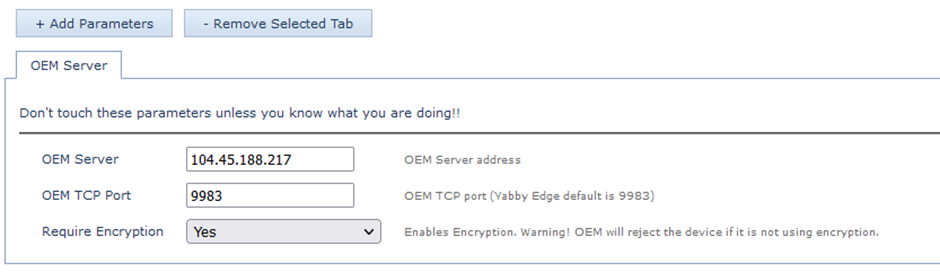
Vodafone SIM users
For Vodafone SIM customers, in some regions, devices are experiencing connectivity issues. When we View Device Logs Numerous instances of "aborting oneshot data" messages are observed.
Aborting oneshot data means the connection was aborted mid data transfer (i.e. we could get on the network, and connect, but it failed after that).
This is generally due to Firewalls on Vodafone's network.
The user should request to Vodafone:
“Please update the APN access list for the SIM cards with all IP addresses and FQDNs from this article. Please include the US and EU instances to ensure cross-over access at a later stage.”
Roaming SIM Cards
Modem and network updates have led to their performance improving dramatically. Consult the provider's network and country list for full details - but always test!
Roaming SIM Note
Some networks have in their agreements with roaming SIM providers that their roaming SIMs cannot roam for too long on the home network continuously - or they may be switched off. Check with your providers before deploying large device volumes!
Some may significantly reduce device battery life - Roaming SIM Cards - Battery Life Impact
These SIMs are mentioned in the tables per country. However, they are listed here for convenience. Check the provider's website for a list of countries and networks the SIMs roam on:
-
Emnify
-
Soracom
-
Hologram
-
Twilio
- 1NCE
-
Onomondo
-
M2M One
-
Vodafone Global Roaming
Our Results/Findings
See our other article discussing Connectivity - LTE-M vs NB-IoT, Coverage, Providers and Roaming summarising our current confidence level in the various technologies and SIMs.
How do I configure any network settings if required?
Our devices use clever firmware features to automatically detect which type of SIM card is installed in a unit on startup, and automatically apply the right settings to get online. We call this Autonet.
In the majority of cases, devices will get online automatically with no special setup. However, this is not a guarantee.
Once online, it is recommended that you specifically configure your settings - but this is easy to do Over-The-Air.
If you are unsure whether your device will get online automatically, it is best that you order a DMLink Cable with your devices. Configuration instructions are detailed here:
In many cases, we've heard from our partners that our latest generation devices automatically connect; without the manual configuration settings done on our previous generations.
