Asset Bulk Update

Written by Matthew Clark-Massera
Updated at November 19th, 2026
Asset Bulk Update
Use Bulk Update in the Telematics Guru web app to apply the same configuration changes to multiple assets at once.
Selecting Assets and the Update Limit
Select All selects assets across all pages of the grid, not just those displayed on the current page. For example, if you have 500 assets with 100 displayed on the current page, Select All selects all 500 assets.
A bulk update can affect a maximum of 10,000 assets at a time. If there are more than 10,000 assets, those beyond the 10,000-asset limit are not affected by that bulk change.
Updating Assets in Bulk
Go to Assets > Manage Assets.
Select the assets you want to change, or use Select All. The Bulk Update button remains greyed out until at least one asset is selected.
Click Bulk Update to open the dialog.
The screenshot below shows where to access Bulk Update.

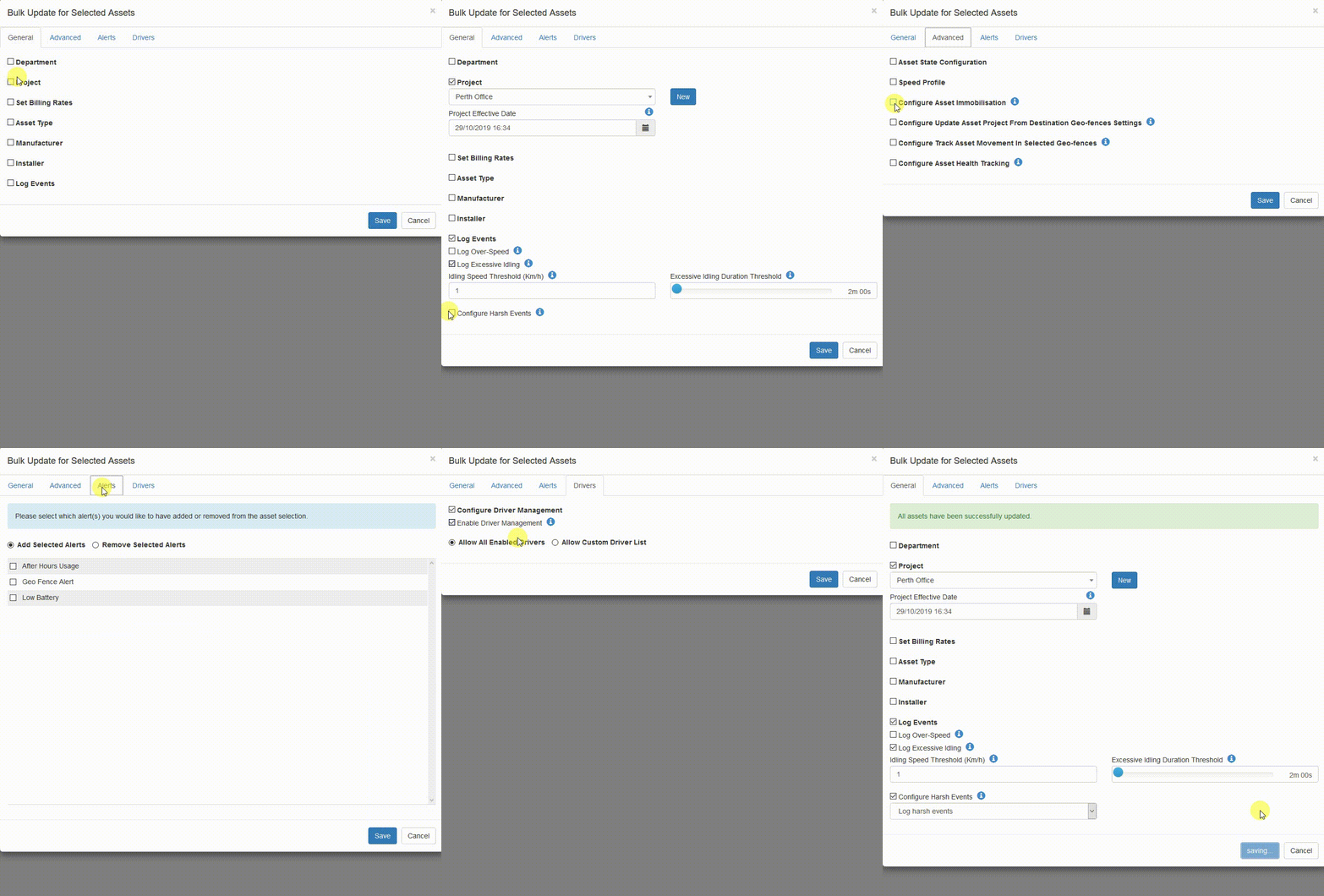
The animation below demonstrates the available bulk update functions and configuration examples.
Next Steps
Use the bulk update dialog to configure the changes you need for the selected assets, keeping the 10,000-asset limit in mind.
