Transported Trips in Telematics Guru

Written by Digital Matter Authors
Updated at November 23rd, 2026
Transported Trips in Telematics Guru
A transported trip shows that an asset moved while its ignition was off, for example when equipment was towed or carried on a flatbed. Telematics Guru shows the movement in the Trip List without adding the trip’s time or distance to the asset’s run hours or odometer.
Identify a Transported Trip
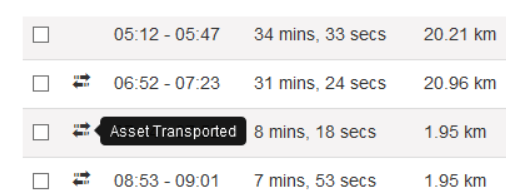
In the asset’s Trip List, look for the two-arrow icon next to the trip time. Hover over the icon to see the Asset Transported tooltip. The row still shows the trip’s duration and distance.
Run Hours, Odometer and Alerts
Telematics Guru distinguishes the device’s trip status from Digital Input 0 (Ignition). The trip status tells it that the asset is in a trip. If ignition stays off, the transported trip does not contribute to the asset’s run hours or odometer, even though the Trip List shows time and distance.
Movement alerts that depend on Digital Input 0 turning on do not trigger for these trips.
Report on Transported Trips
Use the Asset Transport Trip List report to review equipment movements to and from sites over a date range. You can filter the report by asset, driver, project or trip type. The report includes start and end locations and times.
Next Steps
If towing is being treated as an operating trip, check whether the device is set to emulate ignition during movement. See Configure Transported Trips in Device Manager for the setting. For other trip types and how they appear in history, see Getting Started: Trips.
