Contact Us

    If you still have questions or prefer to get help directly from an agent, please submit a request.
    We’ll get back to you as soon as possible.

    Please fill out the contact form below and we will reply as soon as possible.

    • Digital Matter Site
    • Contact Us

    Hyperlink on Asset Live View Popup

    Written by Matthew Clark-Massera

    Updated at January 26th, 2023

      Contact Us

      If you still have questions or prefer to get help directly from an agent, please submit a request.
      We’ll get back to you as soon as possible.

      Contact Support
      • Home
      • Telematics Guru
      • Live View

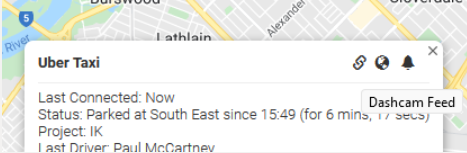
      A hyperlink and title can be added against an asset, to be displayed on the Live View pop-up dialogue on the TG Website. 
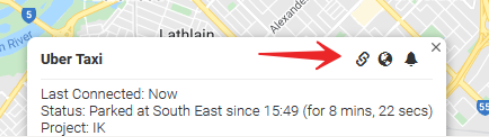
      A title is given to the link which will display on mouse over
      Use Cases:

      • Some assets may have a dashcam installed with it's own video feed (and site to view the feed) this can be 'linked' to the asset via this feature. Clicking on the link will open the relevant page
      • Link to a shared drive i.e. Google Drive or OneDrive - to allow linking to documents within TG.

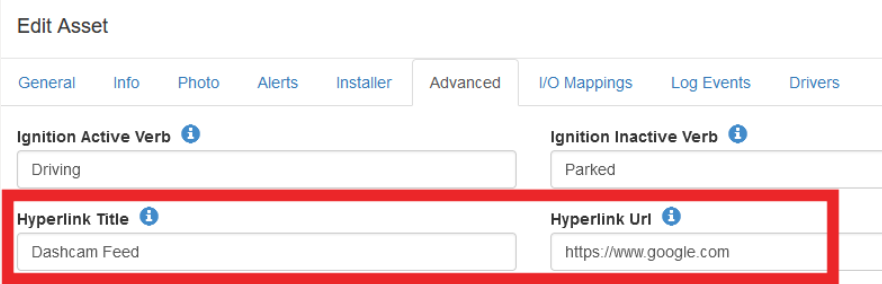
      To configure, simply add the relevant link and title in the Advanced tab of the Edit Asset dialogue.

      The hyperlink URL must be complete (i.e. contain http:// or https://)
      Was this article helpful?

      Yes
      No
      Give feedback about this article

      Related Articles

      • Points of Interest and Distance Order Markers
      • Custom Map Overlays in TG
      • Live View - Telematics Guru

      Subscribe to Partner News

      Subscribe to our mailing list to receive Digital Matter news, product and tehnical updates, and more.

      Subscribe

      Copyright © Digital Matter . All Rights Reserved.

      Privacy Contact Support

      Knowledge Base Software powered by Helpjuice

      DM Logo
      Expand