Hawk - Power Information

Written by Cameron Everett
Updated at February 6th, 2026
Table of Contents
The Hawk can be powered in a variety of different ways to suit various applications.
1. Powered by only the internal battery
LiPo vs Li-Ion
Lithium Polymer (LiPo) and Lithium Ion (Li-Ion) are very similar terms, that are often used interchangeably.
Li-Ion is a generic term used to encapsulate many different types of Lithium-based batteries.
LiPo especially refers to a certain type of Lithium Ion battery, packaged in a soft aluminium pouch.
Essentially, the LiPo used with the Hawk is a specific type of Li-Ion battery. Both terms are correct when referring to this battery.
The Hawk has a 3500mAh internal rechargeable Li-Po battery.
Battery life estimates, while invaluable, are difficult to generalize for the Hawk.
This is because the battery life is dependent on which sensors are connected to the Hawk, as well as the sampling frequency for the specific application.
For details, please see Hawk-Battery Life Estimates
2. Connected to an external power source (with internal battery enabled)
Another power option for the Hawk is connecting the external power terminals (Vin and GND) to an external power source.
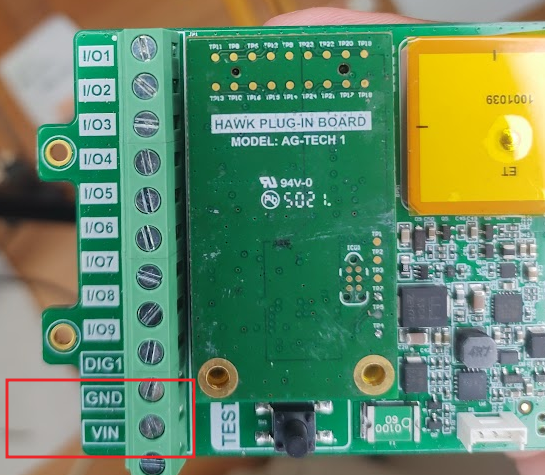
The input voltage should be 6-28V. Recommended 12V or higher.
The external power source could be mains power or a source like a solar panel.
This external power can be used to power the device and keep the internal battery charged. The internal battery can serve as a backup in case the external power drops below the minimum required voltage (e.g. a solar panel at night).
The Hawk has specific FW smarts to deal with "brownout" events. Please see: Hawk - Under Voltage Lockout
For solar panel details, please see Connect a solar panel to the Hawk.
Here is an example of a mains power adapter that could be modified for use with the Hawk: Adapter
The Hawk Pro NTN automatically detects the state of Vbat and Vext, and swaps between charging states automatically.
Hawk Pro NTN - Automatic Detection of Vext/Vbat
FW will automatically check and understand the state of the devices internal battery and/or external voltage (including the D Cells).
The FW logic is displayed below:
- On startup, the device does a status check (is Vext and/or Vbat present?).
- If only Vbat is present, disables Vext for 10min, then does another status check (1)
- If both Vbat and Vext are present, turn on the charger and wait. If Vext is removed, go to Vbat only (2).
- If only Vext is present, wait for 10min then do a status check. If Vext is removed, do a status check (1).
Alert on Battery Connect/Disconnect
As of FW version v1.1, the FW cannot immediately alert when the internal batery is connected or disconnected. It will take ~10 minutes.
You can update the vbatt status immediately by pressing the Test Button. This will also start the device charging immediately. This is for edge cases like:
- Device was powered by Vbat only, then you decided to connect Vext. You have to wait up to 10min before the charger is turned on, or you can press the button to skip the wait.
- Only Vext is present, then the battery is connected, you need to press the button to get it start charging, or wait 10 minutes.
- Both Vext and Vbat are present, then battery is removed, you need to press the button to turn off the charger (reduce sleep current).
3. D Cell Housing
Hawk Pro and Hawk Pro NTN
With the Hawk Pro, the Hawk D Cell Housing is designed to be used with 2 x Lithium Thionyl Chloride batteries.

This allows the Hawk to be deployed for extremely long periods in remote locations where solar panels may not be appropriate.
We highly recommend SAFT LSH20 D cell batteries. Generally look for the spiral type (higher peak current capacity) and avoid the bobbin type. Bobbin type can have issues powering more energy-intensive sensors.
For more information, please see Device Battery Suggestions.
Reduce Sleep Current!
When an external battery pack (like LTC battery) is connected to the Device, we recommend the internal battery charging circuit be disabled.
If not disabled, the internal battery charging circuit will draw extra current from the external battery.
With the internal charging circuit disabled, the passive current draw is much less (~30uA compared to ~200uA)
Disabling the internal battery charging circuit will increase the life of the external battery.
The internal battery charging circuit can be disabled in Device Manager (See below)

Hawk Pro NTN does this automatically, see the above accordian.
WARNING
Do not plug the LTC D cells into the Hawk simultaneously with external power.
Hawk Lite
Warning
Maximum input voltage for the Hawk lite is 5.2V.
Upon a device reset, please wait up to a minute for the capacitors to discharge for the device to reset completely.
With the Hawk Lite, the Hawk D Cell Housing is designed to use 2 x Alkaline batteries.
This allows the Hawk to be deployed for long periods in remote locations where solar panels may not be appropriate.
For example, these Procell batteries.
For more information, please see Device Battery Suggestions.
On Changing Batteries
When replacing the Hawk Lite batteries, discharging the capacitors can take a while if the device is sleeping.
Please wait 90s after removing the batteries to ensure that the capacitors have discharged and the device has reset properly.
4. 3rd Party Internal LiPo battery
Warning
Please note that Digital Matter does not recommend the use of a third-party LiPo battery.
We have provided the information provided below in order to help you achieve the best results if you choose to pursue this route.
Please note that our Warranty does not cover failures as a result of improper third-party battery integrations.
Some customers need to use the Hawk PCBs with their own housings, and thus would like to order their own LiPo batteries to use with the Hawk boards and their own custom housings.
This is not as simple as you might expect, due to the nature of the Hawks on-board battery charging smarts.
The Hawk PCB contains protective circuitry that prevents the battery from overcharging, and also limits charge rates at high temperatures. This is both to preserve battery quality, and also help reduce the likelihood of dangerous battery failure.
The requirements for a LiPo battery that can be used with our battery connector are below:
- 4.1V full charge voltage.
- Most Li-Po batteries should be fine, but if the battery expects higher, the full charge capacity may never be reached.
- Supports 85 or 400mA charge current.
- This shouldn’t be a problem unless the battery is tiny/huge (relative to the standard Hawk LiPo 3500mAh).
- Correct connector and pinout (Molex 51065-0300).
- Left to right (when the test button is to the left of the battery connector): Vbatt, Thermistor, Ground. (See below)
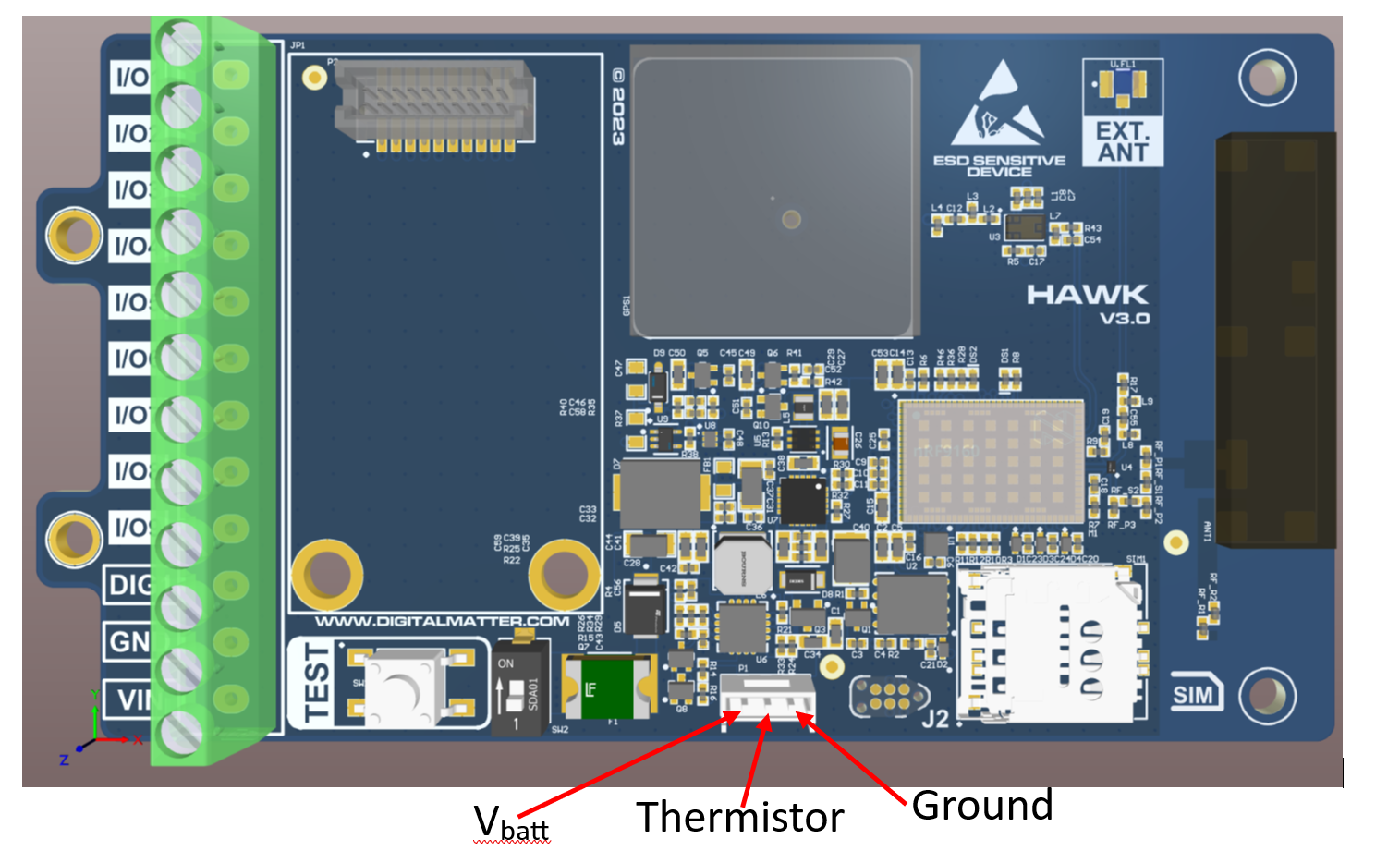
- Integrated NTC thermistor, B = 3435 (this is the temperature/resistance curve).
The LiPo battery we use is custom-ordered from Uniross. It is the UB2529. Please contact Uniross if you require more information, or would like to purchase these yourself.
Note: MOQs from Uniross may apply.
