Hawk - Under Voltage Lockout

Written by Matthew Clark-Massera
Updated at January 21st, 2026
Table of Contents
What is UVLO on the Hawk Pro NTN
When power to the device is insufficient to power the device correctly, (i.e. the battery goes flat), the device will enter an Under Voltage Lock Out (UVLO) state to prevent reboot loops, and damage to any components.
The brownout logic and UVLO logic of the Hawk Pro NTN is more simple than the Hawk Pro.
If a brown out is detected, turn on the charger at low rate and:
- UVLO for 3hrs, then retry an upload.
- The button can be pressed to exit UVLO.
What is UVLO on the Hawk Pro?
When power to the device is insufficient to power the device correctly, (i.e. the battery goes flat), the device will enter an Under Voltage Lock Out (UVLO) state to prevent reboot loops, and damage to any components.
This triggers when the device experiences a brownout, or when, on startup, the internal battery (LiPo) is less than 3.7V.
The UVLO behaviour has been designed to cater for different power setups e.g.
-
Battery + Solar Panel
-
Battery + stable mains power
-
Battery Only
Summary of behaviour:
-
The device resets and enters the UVLO state when the battery goes flat.
-
For a Battery + Solar Panel setup, the logs will show the below
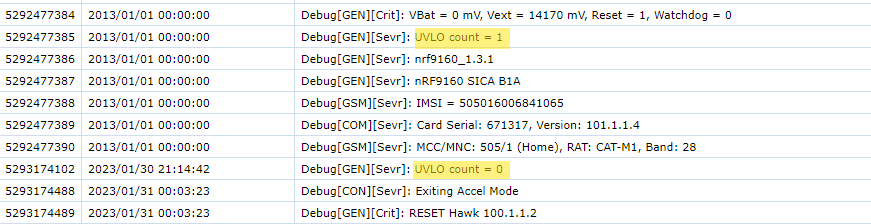
The count is a safety measure in cases where the device resets a lot due to UVLO. The idea is that upon Power On, if the battery is below 3.7V, this count is incremented. Once the count reaches 5, the device will sleep for 5 mins if there is no battery connected or charge for 15 mins if there is a battery connected. -
The device will then wait for external power to be detected
-
Once detected, it will take around 30s to determine if the external power is stable
-
Otherwise, repeat from step 3
The above ensures that on top of avoiding reboot loops, we also avoid entering/exiting UVLO repeatedly in the case of a solar panel outputting a low current trying to charge a flat battery.
Some points to note when bench testing/provisioning the Hawk
-
To avoid getting stuck in the UVLO state use a well-charged battery (3.8V+), or connect a stable external power source (e.g. 12V bench power supply)
- You can exit the UVLO state by pressing the button on the board for around 200ms. The LED will flash to indicate success.
What is UVLO on the Hawk Lite?
On the Hawk Lite, the UVLO behaviour is simplified.
Simply, if UVLO is detected, the device will sleep for 3 hours to allow the batteries to recover.
The device will then wake up and attempt to reconnect.
To avoid a UVLO event, ensure you use high-quality, new batteries.
In addition, ensure that your sensor's power needs are served by the Hawk Lites lower energy budget.
If in doubt, test with a Joulsescope or use the Hawk Pro with LTC batteries or a solar panel.
