Battery Management
Discover essential strategies for optimizing battery performance, extending lifespan, and managing energy efficiency effectively.

Written by Matthew Clark-Massera
Updated at September 11th, 2026
Table of Contents
Battery Management
Digital Matter's battery powered devices report detailed battery statistics that let you monitor battery health, estimate remaining life, and catch problems in the field before they become failures. This article explains how battery monitoring works, how remaining-life estimations are produced, and how to review the data.
Devices fitted with a Battery Meter (Coulomb Counter) track the energy consumed from the battery in mAh and report it upstream. Devices without a battery meter still report other battery-related statistics.
Because of the chemistry of Lithium batteries, remaining battery life is hard to predict from voltage alone. On devices without a battery meter, a 'Battery Good' flag is set or cleared based on measured battery voltage to support low battery alerts. Later methods enable much more accurate and in-depth analysis.
How Battery Monitoring Has Evolved
Digital Matter's approach to battery monitoring has developed through three generations, each more capable than the last.
Voltage only. The earliest and least precise method, still used as a fallback on devices without a battery meter. A 'Battery Good' flag is set or cleared from the measured battery voltage. Because Lithium voltage stays relatively flat until near the end of life, voltage alone is a weak predictor of remaining capacity.
Coulomb counter (battery meter). Devices fitted with a battery meter measure the energy consumed in mAh and derive a remaining percentage against an assumed battery capacity. This was a step change in accuracy for battery powered tracking. A battery meter is fitted on the Remora3 4G, Remora2, Falcon, Eagle and Oyster2.
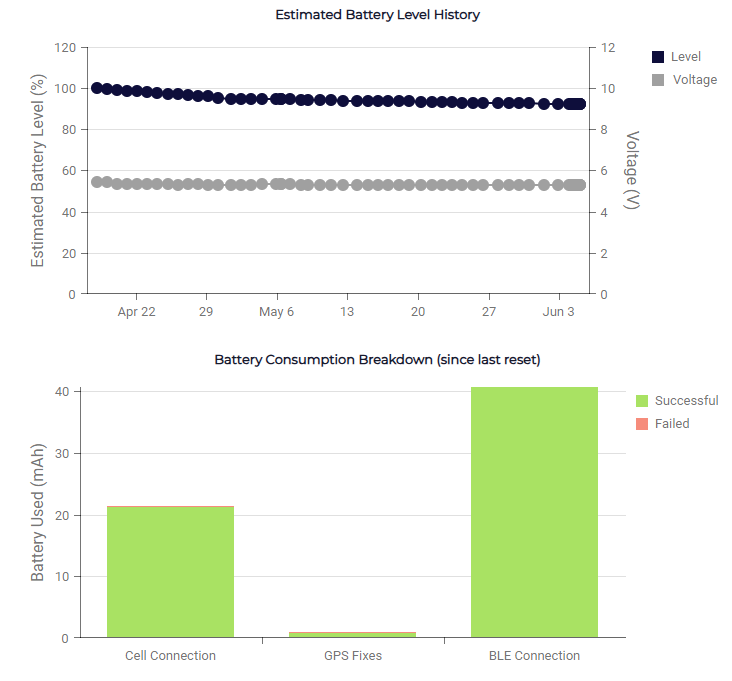
Diagnostics counter estimations. The current-generation method on newer devices such as the Oyster3 and the Barra family. Rather than relying on a dedicated battery meter, these devices build an estimate from the long-term device counters that every device already records. This estimate is surfaced on the device's Device View page in Device Manager.
Understanding Estimations
On current-generation devices, the remaining battery figure is an engineering estimation, not a direct measurement. It works by ascribing an energy consumption value to each activity the device performs, then applying those values to the counts of those activities recorded in the device counters (also known as Device Statistics).
For example, each GPS fix attempt, upload attempt, network registration and period of run time carries an expected energy cost. The accumulated counts of those activities are used to estimate how much of the battery has been consumed and how much life remains.
Because the estimate is built from the counters rather than from a battery meter reading, it is calculated server-side in Device Manager and is viewable on each device's Device View page. On the Device View, the underlying Device Counters and, where available, the Battery Charts provide the raw activity data and the visual history the estimation is based on.

Estimations Improve Over Time
A diagnostics-counter estimation becomes more accurate as real-world statistics accumulate, and it is influenced by device settings and environmental conditions. Resetting device statistics clears this historical data and temporarily reduces the accuracy of the estimate until new statistics build up again.
How Does It Work?
Battery Percentage
If the battery capacity is 3000 mAh and the device reports it has used 1500 mAh since the last reboot, the batteries are at 50%.
Remaining / Predicted Lifetime
If a device has used 20% of its battery over 20 weeks, that equates to 1% per week, so the total battery life is around 100 weeks, with roughly 80 weeks remaining at the current usage rate.
This is affected by any changes to device parameters. When deploying a device in a new application with a particular set of settings and reporting rate, place a device in the field with the required configuration and leave it running for 1 to 2 weeks. The predicted lifetime can then be determined with far greater precision than estimates based on lab-measured current draw and assumptions about how often the device will actually be used.
Factors Affecting the Remaining Battery Estimate
Please keep the following in mind.
Use the battery type recommended for the product. If a product supports different battery options, the firmware must be set up for the correct battery capacity.
Do not mix battery types.
Use brand new batteries. Counters are reset on a Power On Reset, so fresh batteries are essential for useful predictions.
Cold temperatures reduce battery capacity, which is not accounted for in the device counters.
Battery failure is possible, and is more likely in extreme temperatures.
Predictions are based on average historical data for each device. Changes to device settings may lead to performance that does not match the prediction.
Reviewing Battery Data in a Downstream Platform
Once a device reports its battery statistics, a downstream platform can present them for monitoring and reporting. For example, in Telematics Guru the Battery Management tools display per-asset battery percentage, performance counters and a Remaining Battery Life Estimate report. How this data is surfaced depends on the platform you use.
Next Steps
To see the counters and charts behind an estimate for a specific device, open the Device View page in Device Manager. For more on how the underlying statistics are recorded and how resetting them affects estimates, see the Device Statistics documentation.
