How do I Activate a Movement Alert?

Written by Matthew Clark-Massera
Updated at January 26th, 2023
Movement Alert is a one-touch feature to allow the user to set an "anchor" to the asset so that it will notify the user when it next moves.
It is ideal for trailers, recreational equipment, horse floats, boats, motorbikes, dollies, equipment, and even vehicles where the user is concerned about theft of an asset when leaving it temporarily at a location. It saves the user going into the website and setting up a one-time Geo-fence, and then setting up the Alert.
The alert uses the currently logged in users linked address book entry to get their email address and/or mobile number. The movement alert will send an email and a text message (if the user's organisation is enabled, and the address book entry has a mobile number.)
The movement alert is triggered on any of the following conditions being TRUE:
The Asset enters the "In Trip" state
OR
The Asset moves more than 500m from the position where the movement alert was set
The movement alert will fire as soon as the asset enters a 'In trip' state upon movement. This is because there are some cases with devices like the Remoras that we want the alert to be sent as intelligently as possible. The alert will be sent immediately upon the server receiving the In trip status, unless you have upload on trip start disabled as per some battery powered units; Oysters & Yabbys.
Setting the Movement Alert via the website
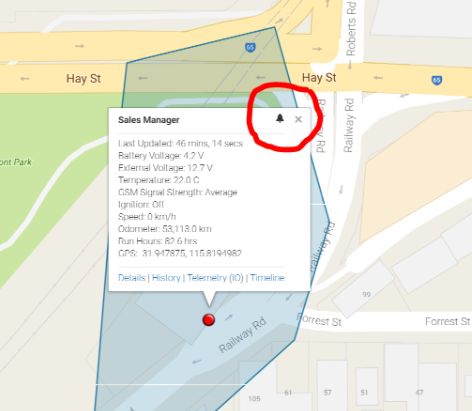
You can activate "Movement Alert" from the tracking website or from the app. The alert goes to the email address saved on the User's profile.
 |
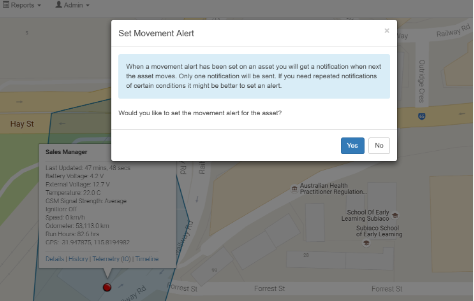 |
Simply click on the 'bell' on the asset pop-up and it will ask if you want a Movement Alert. Then Accept.
Setting a movement alert using the app
 |
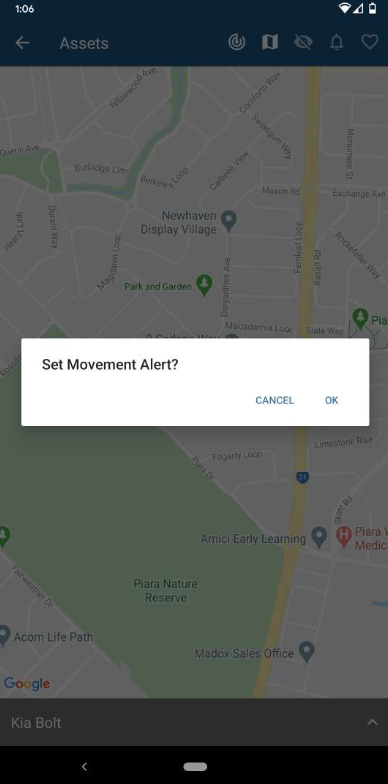 |
| Tap the bell to enable the Alert | Once you tap OK, the Bell will show the Movement Alert is activated |
As with the website, If you want to disable or remove the Movement Alert, press the "bell" again, and say "Yes":
