Hawk - Configure MaxBotix MB7040 I²C Ultrasonic Range Sensor

Written by Matthew Clark-Massera
Updated at October 6th, 2023
Table of Contents
Related Articles
Please ensure to also read the below for full details on configuring Tasks and I²C Sensors for the Hawk
The Maxbotix MB7040 is an Ultrasonic Range Sensor. It is commonly used to measure tank level. It can be placed at the top of a tank, and the distance measured by the sensor gives the distance from the top of the tank to the water - which is then used to work out the level.
3rd Party Sensor
The MB7040 is a 3rd Party sensor - the advice given below is general. Always check the product datasheet direct from the manufacturer. Specific guidance on installation and usage should be obtained directly from the manufacturer. The instructions below are based on a sensor tested at the time of article writing - things may change.
IO Card
Ensure a plug-in IO card with an I²C interface is fitted to the Hawk. Currently the only card with this interface is the AgTech1 card.
Wiring
| MB7040 | Agtech 1 | Bluetooth+ |
| VCC (3v3) | Hawk IO 5 | Hawk IO 7 |
| SCL | Hawk IO 6 | Hawk IO 5 |
| SDA | Hawk IO 4 | Hawk IO 6 |
| GND | Hawk GND | Hawk GND |
Parameters
I²C Action Parameters
- Select MB7040 as the Sensor Type
- Choose an Analogue to write the value to (14 is shown below)
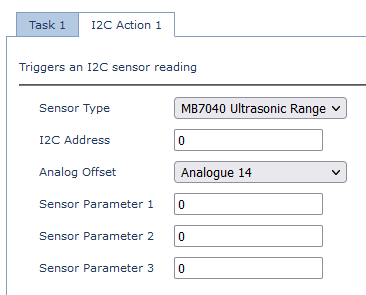
The I²C address can be left blank. For reference address 224 (0xE0) is polled when taking a reading.
Task Parameters
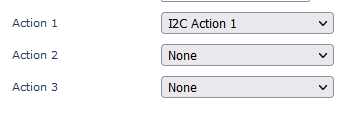
Ensure the I²C action you have configured above (Action 1 or 2) is set as an action of the task.
Output/Conversion
With the above parameters, the output would be:
| Value | Analogue | Units | Conversion Example |
| Distance | Analogue Offset Value | cm | 45 = 45cm |
