Hawk - Configure DM Temp Probe (Deprecated)

Written by Matthew Clark-Massera
Updated at October 6th, 2023
Table of Contents
Related Articles
Please ensure to also read the below for full details on configuring Tasks and I²C Sensors for the Hawk
The DM Temperature Sensor is no longer manufactured by DM. If you have one on hand to use with the Hawk, setup is as below.
Wiring
| Sensor Wire | Agtech1 | Bluetooth+ |
| Red (3V3) | Hawk IO 5 | Hawk IO 7 |
| Brown (SCL) | Hawk IO 6 | Hawk IO 5 |
| Orange (SDA) | Hawk IO 4 | Hawk IO 6 |
| Black (GND) | Hawk GND | Hawk GND |
| Green (Address Select) | This sets the sensor's address. Connect to GND to set as Temp Probe '1' - 150 (0x96) Connect to Hawk IO 5 (3V3) to set as Temp Probe '2' - 158 (0x9E) |
This sets the sensor's address. Connect to GND to set as Temp Probe '1' - 150 (0x96) Connect to Hawk IO 7 (3V3) to set as Temp Probe '2' - 158 (0x9E) |
Parameters
Sensors - I²C Action Parameters
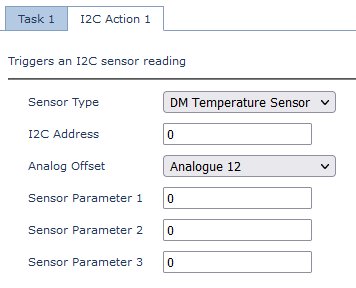
We need to configure 1 or 2 probes to be read as part of an I²C Action
Probe 1
The "default" I²C Address is 150 - so if we leave it blank, the below reads from Temp Probe 1
Probe 1 is the probe we have wired with the Green wire connected to GND
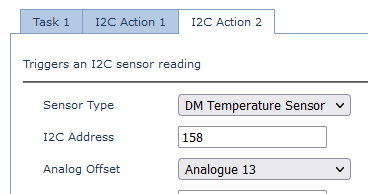
Probe 2
To read from Temp Sensor 2, set the address to 158
Sensor 2 is the sensor we have wired with the Green wire connected to 3V3.
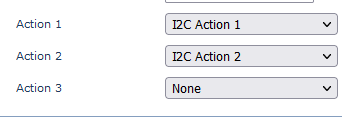
Task Parameters
To read both during the task, set up both I²C Actions in the task. If using only 1 probe configure only 1 action etc.
Output/Conversion
With the above parameters, the output would be:
| Value | Analogue | Units | Conversion Example |
| Temp Probe 1 | Analogue Offset Value (12) | °C * 100 | 800 = 8°C |
| Temp Probe 2 | Analogue Offset Value (13) | °C * 100 | 800 = 8°C |
