Yabby Edge Celluar - FAQ

Written by Matthew Clark-Massera
Updated at April 29th, 2024
How does the device get a position?
The Yabby Edge 'scans' for GNSS and WiFi signals. It then sends this data up to the server, along with Cell Tower information from the connection.
This data is sent to our Location Engine for processing, which resolves a position from the raw data.
It is done this way as:
- It is much lower energy than a typical GNSS fix.
- The 'scan' uses about 0.01mWh
- A typical cold-start fix uses about 0.6mWh - 60 times more energy!
- Positions can still be obtained where there is no GPS available (indoors, inside shipping containers, in warehouses)
What is the location accuracy?
~5m-80m for a GNSS location
~10m-100m for a WiFi location - depends on how many Access Points are in range
~250m - 1km for a Cell Tower Location - depends on how many cell towers are nearby
Resolved locations are filtered on the Location Engine - so that any positions not within acceptable accuracy limits are discarded.
What are the differences between the Yabby Edge and other devices like the Yabby GPS/Oyster2
The key difference is that the Yabby Edge does not resolve its position on board. This has a few important caveats which are discussed here: "Edge" vs 'Traditional' GPS Devices, main ones being
- No speed or heading reported
- No Geofence Downloads feature available.
How long will the battery last?
See Yabby Edge 4G Battery Life
Up to 10 years at one daily update
Up to 2 years at once hourly updates (24 updates per day).
New components and clever power-saving firmware features have seen significant improvements in the battery life!
5 x that of the Yabby GPS
More battery life than the Oyster2!!
How can I tell when the battery is low?
Alerts on battery 'low' and 'critical' states can be configured - Battery Monitoring - Yabby Edge Cellular
Can I ping/SMS the device to wake it up?
No. The Yabby Edge cannot be 'woken up' remotely to force an update.
In order to save power, the device only wakes up periodically to do a location scan and/or upload (it varies this rate if it is on the move or not intelligently).
In between, it is in a deep sleep, with the cellular modem off - so it has no way to receive a command to check in while in this state. This is what gives such great battery life.
What is the pricing structure?
There is a per device fee + charges per location lookup (as the services that resolve locations attract a cost). While the structure is different the end cost will in most cases be the same or lower than current charges for other devices.
Speak to our sales team for further details.
How frequently can I set the device to update?
The device can be put into Recovery Mode like our other devices in our range - and 'live track' (stay connected with 30 second updates) - in the event of theft or loss. Recovery mode can be activated even if we have set the device up for 1 or 2 daily updates (however it doesn't kick in until the next scheduled updated).
How can I tell if the device is connecting to LTE-M or NB-IoT?
The default parameters are set up for our devices to use both networks. The settings can be updated to use a specific one. Setting the Network Profile - LTE-M/NB-IoT devices. We can see what it is actually connecting to via the Device Logs in OEM. After the device starts up - we will see logs like this:
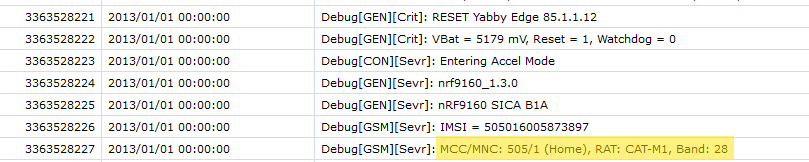
If the device last RESET a long time ago, we might not see any logs. We can trigger a reset with this button

After the next connection - the device will then reset and we can then check the log.
Can I use the Yabby Edge on a 3rd party tracking platform/server?
Yes, you push data to a 3rd party tracking platform/server using HTTPS JSON connectors. Digital Matter's Location Engine server first resolves the raw GNSS, Wi-Fi Geolocation and Cell Tower data before sending the resolved location payload (as a JSON) to your platform. - Forward Edge Device Data to my Endpoint (Cellular)
How long will the batteries last in recovery mode?
Here is how the Yabby Edge Edge operates while in Recovery Mode.
With fresh batteries in, and the device on the move, we should see about 1-2 weeks in Recovery Mode.
