Configure Transported Trips in Device Manager

Written by Digital Matter Authors
Updated at November 23rd, 2026
Configure Transported Trips in Device Manager
Use Movement Trips to track equipment when it is towed or carried on a trailer without reporting that its ignition is on. A platform that supports transported trips can distinguish this movement from asset operation. For example, Telematics Guru displays it as a transported trip without adding to the asset’s run hours or odometer.
Supported Devices
The hard-wired device guide documents this configuration for the following models.
| Device family | Models |
|---|---|
| Arrow | Arrow Global BLE |
| Dart3 | Dart3-2G, Dart3-4G, Dart3-4G-BLE, Dart3-Global-BLE |
| G70 | G70-2G, G70-4G, G70-4G-BLE |
| G120 | G120-2G, G120-4G |
| G150 | G150-Global |
Set the Movement Trip Input
Find the device in the Device Grid, then select Device Operations > Parameters > Edit System Parameters.
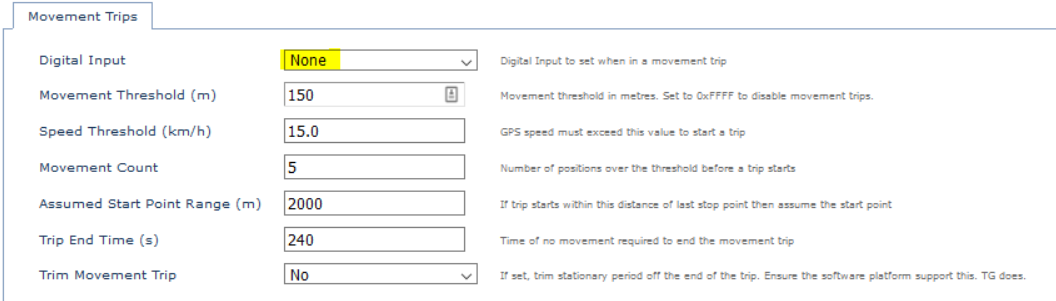
Open the Movement Trips tab. If it is not already shown, look for it under Add Parameters. Available parameters depend on the device and firmware.
Set Digital Input to None instead of Emulated Ignition (0). You do not need to change the other movement settings for this change.
Select Update. The device receives the change the next time it connects. See Making Changes to Parameters for more on editing parameters.
What the Device Reports
This setting does not disable movement detection. When the device detects movement and starts a movement trip, it sets the Trip Status Flag without using the movement trip to activate Digital Input 0 (Ignition).
For third-party integrations, bit 0 of the digital status flags is trip status. It is separate from Digital Input 0, which is ignition. A trip status flag with ignition inactive indicates movement without an active ignition signal.
Next Steps
Once the update has applied, use your telematics platform to check a trip where the asset was moved with ignition off. Confirm that the trip was recorded separately from normal operation. If you use Telematics Guru, see how to identify and report on transported trips.
If the asset normally relies on emulated ignition to log operating trips or trigger ignition-based alerts, test those workflows before applying the change to other devices.
