Hawk - Connecting GA Weather Station

Written by Matthew Clark-Massera
Updated at May 22nd, 2024
Table of Contents
Related Articles
Please ensure to also read the below for full details on configuring Tasks for the Hawk
3rd Party Sensor
The GA Weather Station is a 3rd Party sensor - the advice given below is general. Specific guidance on installation and usage should be obtained directly from the manufacturer. The instructions below are based on a sensor tested at the time of article writing - things may change.
The GA Weather Station is a Hongyuv HY-WDC6E Weather Station.
IO Card
Ensure a plug-in IO card with an RS-485 interface is fitted to the Hawk. Currently, the only card with this interface is the RS-1 card.
Wiring
| GA Station | Connect to |
| Red (V+) | 7-30V DC Power (Separate to Hawk) The Station cannot be powered via the Hawk due to it's high current requirement and need to remain permanently powered |
| Black (GND) |
GND |
| Yellow (RS485 A) | Hawk IO 4 (RS485 A) |
| Green (RS485 B) | Hawk IO 3 (RS485 B) |
Parameters
RS485 Action Parameters
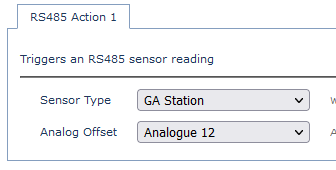
- Select GA Station as the Sensor Type
- Choose an Analogue Offset.
-
7 separate readings are reported by the weather station.
- The offset defines where the first reading goes, with the others in following analogues
- In the example below this would be readings in analogues 12,13,14,15,16,17 and 18.
-
7 separate readings are reported by the weather station.
Warning!
In order accurately measure accumalated rainfall, you need to constantly power the weather station.
If the station resets (due to power loss), it will lose its rainfall count.
Task Parameters
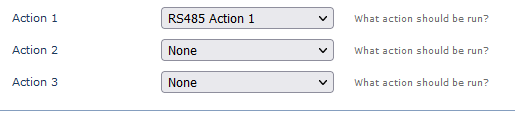
Ensure the RS485 action you have configured above is set as an action of the task.
Output/Conversion
With the above parameters, the output would be:
| Value | Type | Analogue | Units | Conversion Example |
| Temperature | INT32 | Analogue Offset Value | °C * 100 | 800 = 8°C |
| Humidity | UINT16 | Analogue Offset Value + 1 | % * 100 | 5000 = 50% |
| Wind Speed | UINT32 | Analogue Offset Value + 2 | cm/s | 500 = 500cm/s = 18km/h |
| Wind Direction | UINT16 | Analogue Offset Value + 3 | Degrees | 127 = 127° |
| Pressure | UINT32 | Analogue Offset Value + 4 | Pa | 10021 = 10021 Pa = 100.21hPa |
| Precipitation | UINT32 | Analogue Offset Value + 5 | mm | 120 = 120mm |
| Illuminance | UINT32 | Analogue Offset Value + 6 | mW/mm² | 1000 = 1000mW/mm² |
