You are viewing an Archived item in your Knowledge Base, it is not publicly accessible.

    Contact Us

    If you still have questions or prefer to get help directly from an agent, please submit a request.
    We’ll get back to you as soon as possible.

    Please fill out the contact form below and we will reply as soon as possible.

    • Digital Matter Site
    • Contact Us

    Upgrading the Sigfox Config App

    Written by Matthew Clark-Massera

    Updated at March 5th, 2025

      Contact Us

      If you still have questions or prefer to get help directly from an agent, please submit a request.
      We’ll get back to you as soon as possible.

      Contact Support
      • Home
      • Devices

      The latest version of the Config App will automatically check for updates each time you start it, so long as you are connected to the internet. If you had previously installed an older version of the application, you may see a message like this when installing the new version for the first time:
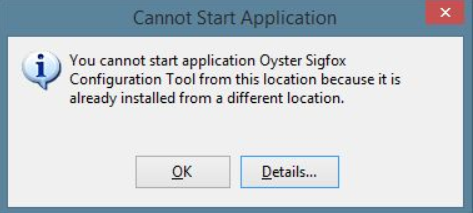
      In this case, you must first uninstall the old version.

      In Windows 10, you must:

      1. Open the Start Menu
      2. Click Settings
      3. Click System
      4. Select Apps & Features from the left pane
      5. Select the Oyster Sigfox Configuration Tool in the list, and click Uninstall

      In older versions of Windows, you must:

      1. Open the Control Panel
        1. Press the Windows Key and R on your keyboard at the same time
        2. Type control in the Run dialog box that pops up, and press enter
      2. Select Programs And Features
      3. Select the Oyster Sigfox Configuration Tool in the list, and click Uninstall

      You may also encounter a security prompt such as this one during installation:
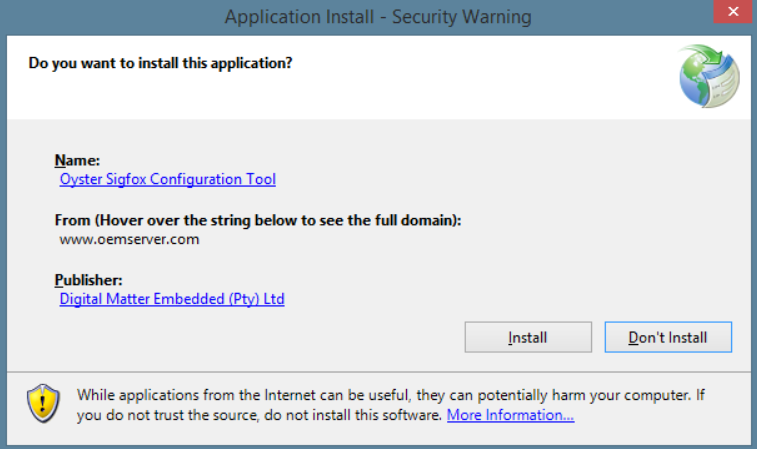
      This is perfectly normal. Please verify that the publisher is Digital Matter Embedded (Pty) Ltd, then click Install.

      upgrade sigfox

      Was this article helpful?

      Yes
      No
      Give feedback about this article

      Related Articles

      • How to Use Parameter Templates

      Subscribe to Partner News

      Subscribe to our mailing list to receive Digital Matter news, product and tehnical updates, and more.

      Subscribe

      Copyright © Digital Matter . All Rights Reserved.

      Privacy Contact Support

      Knowledge Base Software powered by Helpjuice

      DM Logo
      Expand