Contact Us

    If you still have questions or prefer to get help directly from an agent, please submit a request.
    We’ll get back to you as soon as possible.

    Please fill out the contact form below and we will reply as soon as possible.

    • Digital Matter Site
    • Contact Us

    Hard Wired Devices: Disable Movement Trips

    Written by Matthew Clark-Massera

    Updated at May 12th, 2023

      Contact Us

      If you still have questions or prefer to get help directly from an agent, please submit a request.
      We’ll get back to you as soon as possible.

      Contact Support
      • Home
      • Device Features

      Applies to:

      Device Firmware Version
      Bolt2-4G  All Versions
      Dart3-2G and Dart3-4G All Versions
      G120-2G and G120-4G All Versions
      G70-2G and G70-4G All Versions

      All Hard Wired devices have 3 methods of trip detection

      1. Ignition based (based on white ignition line being wired in)
      2. Movement Based (GPS movement)
      3. Run Detect (Based on changes in external voltage)

      Be sure to see Overview of Operation: Hard Wired Devices for more information.

      For the Dart3, G120 and G70 - Ignition and Movement based trips are enabled by default.

      For the Bolt2, only Movement based trips are enabled by default. 

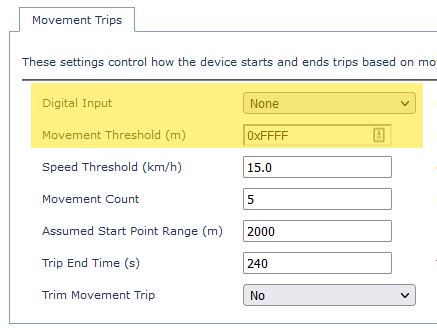
      For some applications, we may want to disable movement trips. To do so, we simply need to edit the parameters, add the Movement Trips parameter tab, and change these 2 parameters to the values shown. 
      tripping motionless

      Was this article helpful?

      Yes
      No
      Give feedback about this article

      Related Articles

      • GPS Jamming and Interference Detection
      • Digital Inputs Introduction
      • Digital Outputs - Introduction

      Subscribe to Partner News

      Subscribe to our mailing list to receive Digital Matter news, product and tehnical updates, and more.

      Subscribe

      Copyright © Digital Matter . All Rights Reserved.

      Privacy Contact Support

      Knowledge Base Software powered by Helpjuice

      DM Logo
      Expand