Sentrius Laird BT510 Multi-Sensor

Written by Matthew Clark-Massera
Updated at January 22nd, 2024
Table of Contents
Our Bluetooth® gateway devices support the reading of generic tag data (see Integrating Tags and 3rd Party Bluetooth® Tag Support) without needing special firmware modification per tag.
This means various 3rd party tags can be quickly and easily made to work with our devices. An example of this is the Laird BT510 this is a Bluetooth® 5, long-range multi sensor. Full specifications can be viewed on the Laird website. This tag incorporates a magnetic reed switch, temperature sensor and accelerometer on the tag.
The custom tag integration method was used to test this tag. Now we have added this tag to the drop down list in parameters.
Note
This tag is highly configurable. The below setup will only work for certain tag configurations - i.e. when it is configured to transmit the LE Coded PHY frame as per 4.1.3 of the BT510 user guide. To read other messages sent by this tag, a different Custom Tag Type string can be used as per the Integrating Tags method.
To read this frame:
- Enable BLE Globally (BLE Global Settings)
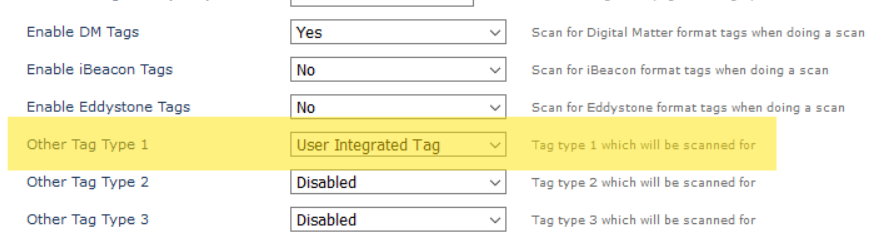
- Under BLE Continous or Period Scanning settings, make sure to scan for User Integrated Tags
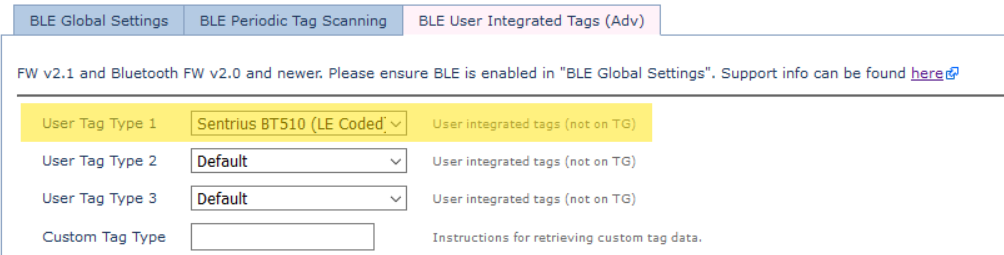
- Under User Integrated Tags, select the Sentrius BT510 from the dropdown. This is equivalent to entering 255,38,0,77000200,11,20 into the Custom Tag Type Field
- Set the Scan Technology to Long Range

