LoRaWAN® Config Cable

Written by Matthew Clark-Massera
Updated at December 9th, 2024
Digital Matter first generation Sigfox and LoRaWAN devices require a configuration cable in order to program parameters, set LoRaWAN regions, and read device information (AppKey, DevEUI, PAC etc)
It is strongly recommended you purchase a cable from Digital Matter. Damage caused to devices by your own cable is not covered under warranty.
The cable supplied is the following FTDI Cable:
FTDI TTL-232RG-VSW3V3-WE
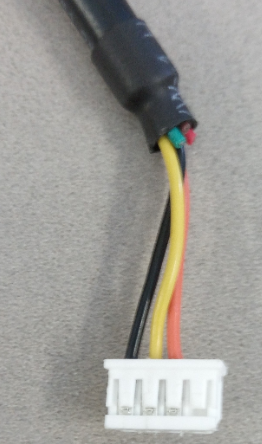
The required pins for Digital Matter devices are:
Black - GND
Yellow - RX
Orange - TX
Which connects to a Molex Connector (parts 0510650400 and 0502128100) as shown in the image. This is a 4 position Micro-Latch 51065 connector with 2mm pin spacing.
This cable is required for all first generation Sigfox and LoRaWAN devices. The Yabby LoRaWAN requires this cable plus an extra adapter cable. However, second generation devices like the Yabby Edge LoRaWAN and the Oyster 3 LoRaWAN use the new DMLink adapter.
| LoRaWAN Device | Required Adapters |
| Oyster | FTDI cable |
| Yabby | FTDI cable + 6 pin adapter |
| Guppy | FTDI cable |
| G62 | FTDI cable |
| SensorData | FTDI cable |
| SensorNode | FTDI cable |
| Oyster 3 | DMLink |
| Yabby Edge | DMLink |
| Yabby 3 | DMLink |
