Troubleshooting - Edge Devices Not Updating Location

Written by Simone Naidoo
Updated at June 30th, 2025
Table of Contents
Is your device's position stuck or not updating when it's out of range of GNSS (GPS) and Wi-Fi signals? You might expect it to fall back to cellular location, but this does not appear to be happening.
This article explains the specific reasons why this occurs and how to troubleshoot this common scenario.
Default Lookup Settings
The Location Engine attempts the following lookups, in order. This is in order of relative accuracy of each method.
- LE-GNSS (GNSS lookup) - 30-100m typical accuracy
- LE-WIFICELL (WiFi lookup) - 30-100m typical accuracy
- If cell scan data is available - it is also sent in the same API call along with the Wi-Fi access point data.
Please see Location Engine Lookup Settings for more details.
When both GNSS (GPS) and Wi-Fi positioning are unavailable, your device can fall back to using cell tower data for location. However, cellular accuracy is significantly lower than GNSS or Wi-Fi, and our system employs specific filtering to prevent misleading or "phantom" movement on the map.
If your device is stationary or only moving very short distances (e.g., within a building, or a vehicle slowly creeping in traffic), and only cell tower data is available, the system will likely filter out the less accurate cellular updates until a substantial change in position is detected. This prevents the map from showing misleading movement.
- The cellular accuracy is much less than that of GNSS or WiFi, so we only use this position if we've moved a great distance without a GNSS or WiFi fix. This stops scenarios where a device appears to move on the map, simply because it's getting updated cell fixes, but in reality, is in the same spot.
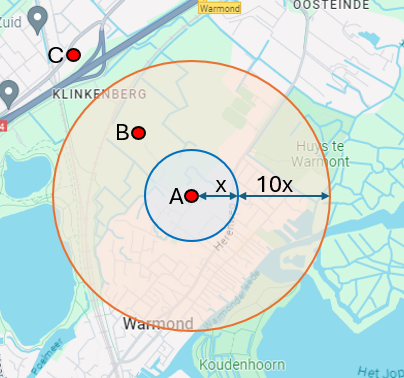
- The cellular lookup result is discarded if it is less than 10x the accuracy (of the new lookup) away from the last location. The minimum accuracy bound is 100m, this means that the location has to be further than 1km away from the last location to be considered valid.
- For example, in the image below, with the last successful position at Point A with accuracy X. If the cellular lookup result is at Point B, no position is returned. If the cellular lookup result is at Point C, Point C will be returned, with the Position Source = 7.