Bluetooth® Beaconing with DM Devices
Use your Digital Matter Device as a Bluetooth Beacon

Written by Richard van Rijckevorsel
Updated at July 3rd, 2025
Table of Contents
Beaconing
Many devices have a Bluetooth® module on board - allowing the reading of data from BLE tags and sensors, acting as a BLE gateway.
The Oyster Edge and Manta Fusion can be additionally configured so that the device will advertise as a Bluetooth beacon in Eddystone, iBeacon or DM formats.
Advertising using the DM protocol allows the device to share the device name, voltage and temperature in Digital Matter's beacon format, such that a gateway would be able to detect the tag.
Applications
- Room-by-room Location
- Security and Access Control
- Asset lost/found
- Inventory Level Monitoring
Supported Devices
| Product | Firmware Version Required |
| Oyster-Edge-4G | v1.14 |
| Manta Fusion | v1.3 |
Parameters
BLE Beaconing Configuration (Adv)
Select in which format you would like the device to beacon, and set the device data around this
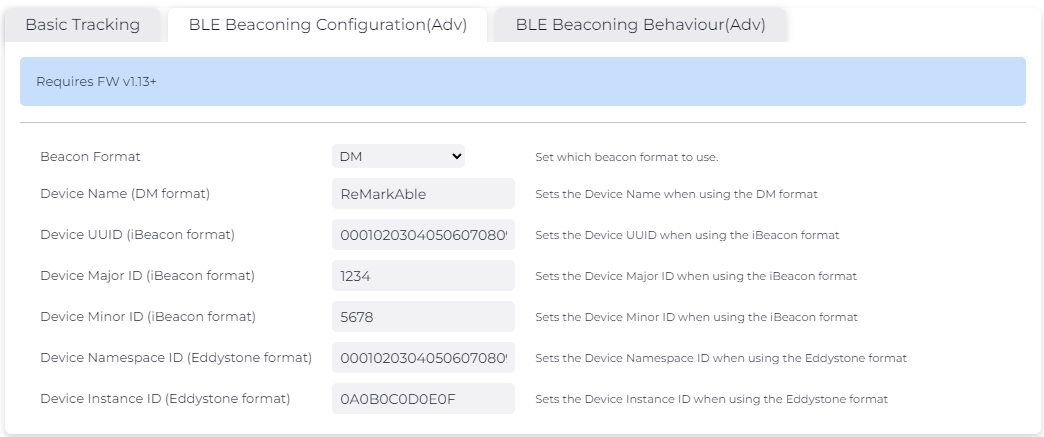
- Beacon Format: Select which beacon format to use; DM, basic iBeacon and Eddystone UID formats
- Advertising using the DM protocol allows the device to share device name, voltage and temperature
BLE Beaconing Behaviour (Adv)
Select how you would like the device to beacon, and adjust the power, interval and duration of advertising
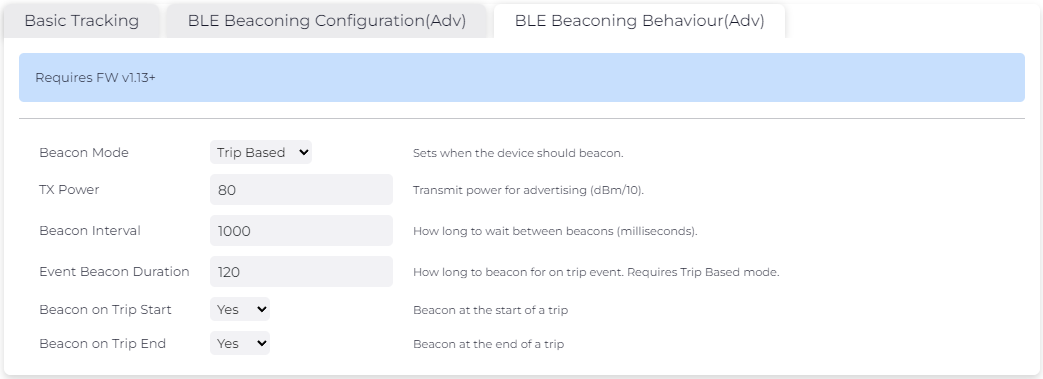
- Beacon Mode: Continuous or Trip Based
- TX Power: Transmit Power to be used for advertising (dBm/10)
- Higher TX = Greater beaconing distance, shorter battery life
- Lower TX = Shorter beaconing distance, longer battery life
- Max TX = 80 dBm/10
- Beacon interval: Time in ms between each beaconing event (when in contiunous mode)
- Event Beacon Duration: Length of beacon event for trip based event (trip start or trip end). Must have trip mode enabled
- Beacon on Trip Start: Beacon every x [Beacon interval] milliseconds for y [Event based duration] seconds at the start of a trip
- Beacon on Trip End: Beacon every x [Beacon interval] milliseconds for y [Event based duration] seconds at the start of a trip
Example:
From the example above, the device will behave normally while in trip and stationary, but when a trip starts or ends, the device will beacon the DM protocol at 8 dBm every 1000ms for 120ms and then stop until the next trip event.
Impact on Battery Life
Using the default settings, i.e. continuous beaconing at a period of 1 second and the max TX Power (8dBm), the Oyster Edge uses just less than 1% of the battery capacity per year. This can be further improved by increasing the beacon period and/or decreasing the TX Power.
Trip Based beaconing further reduces the impact on the battery life. In the worst case conditions, the Oyster Edge can use about 1% of the battery capacity per year.
Therefore the impact on battery life is negligible.
